Emerge

How To’s

Facebook Advertising, Guides, How To's, Online Marketing, Our Blog, Social Media

Post Publishing Analytics and why you should start doing it

You’d think that the moment you post your content, the job is done there. But it’s simply not true. There’s so much more data you can extract from one post you published! From the reach, the engagement to mere clicks, you can assess how your audience received your posts. Knowing this helps you learn which posts work and which don’t work when it comes to the audience you’re reaching. In this blog, we’ll walk you through how Post Publishing Analytics could be of benefit to you so keep on reading to check if you want to try it for yourself! Benefits Behind Post Publishing Analytics Charts, data, analytics… I bet just thinking about it overwhelms you but believe it or not, post publishing analytics is a powerful tool. It can help content creators understand their audience better and make informed decisions about their content. It provides valuable insights into the performance of posts, such as the engagement rate, reach, and impressions. This data can then be used to optimize future posts for better results and increased ROI (return on investment). With post publishing analytics, content creators can also gain a better understanding of their audience’s preferences and interests, allowing them to create more targeted content that resonates with them. By leveraging post publishing analytics, content creators can maximize the impact of their work and ensure that they are providing valuable information to their readers. Understanding what your audience likes and dislikes Understanding what your audience likes and dislikes is an essential part of creating great content. It’s not enough to simply write about topics that you think are interesting; you need to understand the needs, wants and interests of your readers if you want to create content that resonates with them. The key to finding out what they like and don’t like is post publishing analytics. After all, numbers don’t lie. From the data that shows your audience’s interaction, you can tell alot whether they were fond of your postings or not. By taking the time to research and understand what your audience likes and dislikes, you can create content that is tailored to their preferences. This will help you build a loyal following who will be more likely to engage with your content, share it with others, and come back for more in the future. Finding the best time to post your content Finding the best time to post your content is one of the basic strategies for making sure that your content reaches the right audience. It can be a time-consuming task, but with the help of analytical tools, you can easily find out when is the best time to post your content. With tools that analyze past data and user behavior to determine when is the most optimal time for posting content and taking into account other factors such as user engagement and demographics, you can easily determine which times are best for posting your content and maximize its reach. Ultimately, you’d reach your audience target audience easily. Identify which platform helps you shine more As the digital world continues to expand, it is becoming increasingly important to identify which platform will help you shine more. With so many different online platforms available today, it can be difficult to determine which one is best for your needs. However, by understanding the features and benefits of each platform, you can identify which one will help you grow. With the right strategy coupled with the right analytical tools, you can find the ideal platform that will help you reach your goals and make a name for yourself in your industry. Post publishing analytics can be done in various platforms and with the right comparative analysis, you can check which platform suits and complements your brand better. Enumerates what type of content works for you Content marketing is a powerful tool for businesses to reach their target audience and build relationships with them. But it’s not enough to just create content; it’s important to know what type of content works best for your business. So it’s important to take note of the different types of content that you can use, as well as the benefits they offer and check which not only suits your brand best. It’s as important to check how well the different types perform after publishing. You can measure the success of your content and determine which type works best for you with post publishing analytics. Check the numbers, see which has better engagements, try it again and check the pattern that helps lead you to growth. Does informative content work better for your brand? Or are you more fitted for a hard-sell approach? By understanding what type of content works best for your business, you will be able to create more effective campaigns and get better results from your efforts. Important Facebook Analytics Metrics So we’ve talked about the benefits of Post Publishing Analytics, but how exactly do we achieve them? Let’s talk about three of the most important metrics under Facebook analytics to give you a better understanding! Audience Insights Audience insights can provide valuable information about the demographics, interests, and behaviors of your target audience. This data can help you tailor your content strategy to better reach and engage with them. Additionally, audience insights can also provide insight into how people interact with your brand online and what types of content they prefer. By leveraging this data, you can create more personalized experiences for your customers, which will help build loyalty and trust in your brand. Audience insights are essential to understanding the needs of your target audience and you can use this knowledge to create content that resonates with them and drives conversions. Published Content Analytics From mere text posts to uploaded videos, photos, stories and even ads, they all have analytics and you can access them through multiple platforms. By using Published Content Analytics, you can understand how your audience is responding to content and make changes accordingly. This allows you

Guides, How To's, Website Optimization

What makes an Effective Website? Five Simple Tips for Creating Content

Is a website really necessary for your business? A twenty-year-old question, and the answer remains a resounding- YES! A business website is one of your most important marketing tools today. It plays a significant role in your brand and transactions, primarily if you use a digital-first approach to growing your online presence and reaching potential customers. Having a website is one of the many green flags for consumers. It establishes legitimacy, promotes comfort and trust in dealing with transactions, helps you effectively market products, understand customers, and brings them closer when you turn your website into a central point of contact for them and your business’s social media accounts. Sounds about right? But we know you have hurdles; after all, with over 1.9 billion websites, including your competition, how does your website stand out? You’ll need effective strategies to get the most results from your website marketing strategy. Yes, graphic elements and web design are crucial, but start by improving your website’s content first. A website should have consumable and relatable content enough to turn every clicking and browsing into a pleasant experience. Check below five (5) simple tips for creating content for an effective website. Understanding Content for Website Let’s first see the essentials of a website’s content. It is anything on your website that a user can use, read or interact with; categorized into three, you may combine any of these to produce amazing pieces of content. Textual anything written or text-based; blurbs or captions under main headlines usually found on your homepage, blog posts, news articles, product descriptions, or testimonials. Visual: anything your user can see or watch, like an album of pictures, background, video, or an infographic. Auditory anything the user can hear on your site, like songs, background music, click sound effects or podcast episodes. Despite having a myriad of these content forms, consider still a minimal and straightforward distribution. You want a smooth website. That is why understanding your audience’s demographic and psychographic profile can help you determine which contents are worth including. Concise, Clear, and Comfortable to Read Don’t make a website too wordy. Longer paragraphs do not equate to being informative and users would just assume all the information can be found in a pdf copy somewhere. Again, checking your website should feel like an experience- like how a customer visits a physical store. Stay true to your brand’s tagline or motto, pick a few keywords from the latter and reuse them for blurbs or your vision-mission statements. See this homepage by La Rosa Flower Shop – www.larosaflowershop.com Notice the usage of one-sentence content writing? Short yet it informs clearly, creates an impression, and moves the user to navigate more like he/she is window shopping. Furthermore, the usage of transition effects from one short statement to another, accompanied by varying background lessens scrolling action. Repetition of keywords related to the brand increases brand retention, and users begin to be more aware of the product and the business. You can include search engine optimization (SEO) on these keywords to further optimize the site on search engines. If your product or services cannot simply be compressed within one to two sentences, follow the inverted pyramid writing method when writing one-paragraph descriptions or blurbs. This writing style puts all relevant information, such as: Who, What, When, Where, Why, and How, in the first two sentences and proceeds to use the remaining sentences as explainers or additional information. Note: Read through your content before publishing and check for unnecessary words or details you can omit to shorten the text. For blogs or news, the ideal length should be between 2,100-2,400 words. Don’t bombard the article with pictures; one banner is enough; you may publish multiple photos via an album or gallery feature and link it to a keyword or phrase. Avoid Sounding Too “Markety” Users can easily read a “trying-hard” website. Speak your target audience’s language and pattern your content to what they would likely check. Example if your business has products that produce a variety of designs such as a shoe store- you’d most likely use words like: recent, new arrivals, new designs, limited editions. Complement these keywords on product descriptions using words that reflect the customer’s feeling and the benefits from purchasing to wearing them like “comfortable for school” or “perfect fit for the summer.” List specs and additional details, these don’t need to be part of a paragraph or blurb. Check Capital PH, a branded shoe distributor and their website www.capital.com.ph. Notice how they make the pictures shine more than the text? Text here runs more as labels and experiential descriptions rather than invoke the audience directly to purchase. Remember that your site’s end goal is to educate and inform customers clearly about your brand, second is to complete transactions, but definitely not to sell. Integrate your Social Media Content Social media is also a means for engaging communities and a large percentage of your audience is active on social media especially Facebook, Instagram, and TikTok. The Medical City Clark’s website includes social media features. It makes sense to connect the two by including a space on your website into a hub from which your social networks connect or postings are visible. Adding a list to which you direct people to your social profiles is another way of getting this done. Lessen Tabs, Use Links for Redirections Sometimes you have so many things you want people to know about your brand or business you cram all of them on the homepage alone, which leaves a heavy impression. Users might get tired of all the information, which demotivates them to continue browsing features and other parts of your website. Manage the parts of your website creatively but concisely. A recommendable number of tabs is five, which includes ABOUT, PRODUCT, ORDER, FAQs, BLOGS, or other categories. Next is organizing and sorting information under your chosen tabs; for example, history, business story, and awards can all be boxed under ABOUT, and new products, on sale,

How To's

Emerge Like a Hero: 6th Anniversary Special

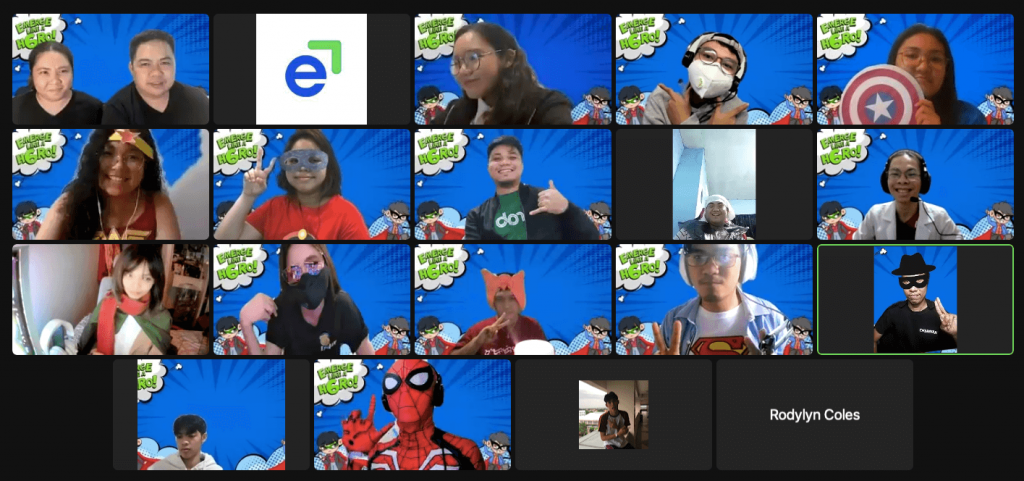
For the past six years, Emerge has been helping businesses from the clutches of obscurity. This year’s virtual anniversary theme, “Emerge Like a Hero,” was coined to show the servant leadership of each Emergians. The party was lively and fun because everyone had to portray their heroes. The event began with each person showing off the superhero costume and telling why they’d picked that particular character. There’s one who wore Spiderman, healthcare workers, Wonderwoman, marketing witch, and more. It was costume party day at Emerge, and everyone had a great time. The team had an awards ceremony to decide who wore the best costume. The theme for this year’s “Emerge Like a Hero” is an encouragement to set goals and work hard to achieve those goals. After all, victory belongs to those who believe in the triumph of their spirit over adversity! The team has the potential for greatness, but it requires a vision and action plan. How Well Do You Know Your Teammates? The team also plays fun, exciting games designed to learn more about the team. The group decided to play how well you know your teammates to get better to know each other. In this game, everyone needs to show who they are through their personal and work plans for the year. Whoever guesses the most people wins. This game motivates employees, improves productivity, and increases team spirit. Anniversary Awards Night The Emergian Awards Night, celebrating outstanding contributions that benefit the whole organization, was virtual this year. The awardees received virtual certificates and cash to recognize their achievements. Toast to us, Heroes! The toast was a way to recognize that they were all heroes. Everyone in the company received a toast and recognition as heroes because they’d all done a great job despite the challenges they faced. We believe that letting people feel recognized for their small accomplishments and reap the benefits of their contributions is crucial to the company. To 2022! Cheers to the heroes of the year and beyond! It’s not just about work. It’s about people working together to help each other accomplish great things. Each one is just as important as the next one, no matter how far apart you are from each other. Everyone did well to help their clients emerge into the world of business. The Emerge founder, Richard Noromor, closed his remarks by saying, “It’s all about the PEOPLE.” As Emerge continues to be the hero for their clients, the team will also embody servant leadership to be the hero of their own.

Electrical Engineer
Facebook Advertising, How To's, Our Blog, Search Engine Marketing, Search Engine Optimization

How To Set Up Facebook Ads Custom Conversions

Have you needed to measure and track the performance of the specific pages on your website? Welcome to the 21st century, where every penny spent on advertising on Facebook can be measured – at least for Facebook Ads and Google Ads (we will only tackle Facebook Ads in this blog post). Now this is a great thing to hear if you are a business owner taking advantage of the Facebook advertising platform. It can all be done with a piece of code. So what are Custom Conversions? Custom Conversions allow us to track and optimize actions on specific web pages. It is the simplest form of conversion tracking, requiring no modification of the Facebook pixel code on your website. This tracking method is contained within the Facebook Ads Manager and uses the URLs of the pages you want to track. Here’s how to set it up. Place Standard Event First thing you need to do is to place the standard event on all thank-you pages you want to use to track a specific event: Here are the nine standard events: View Content Search AddToCart AddToWishlist InitiateCheckout AddPaymentInfo Purchase Lead CompleteRegistration Once you have placed the event on the pages you want, you should see the event show up as active on your pixel page. You’ll see something like this… Set Up Custom Conversions To start, determine all specific thank-you page URLs for each brand and then start creating custom conversions. Think about the online goals (macro and micro) you want to track after people visit your site. Here are few of them: Submitting a request a quote form Scheduling an appointment Registering for a product demo Downloading an eBook Adding an item to a shopping cart Initiating a check out Completing a purchase In the screenshot below, you can choose one rule option: URL Contains, URL Equals, or Event. Let’s say the thank you page is www.emergelocal.com/thank-you, this is how you implement it: URL Contains: thank-you, ORURL Equals: www.emergelocal.com/thank-you The Event option is applicable when you place the standard events. It needs technical skill. If you want to find out how, you can contact us. Next, you choose a category. Choose the category based on the standard event that was placed earlier. Once you’re done choosing a category name, hit “Next”. Protip: Name it based on the specific page you are tracking because this will be how you see the conversions in reporting. The conversion value is optional but I highly suggest to put a value – think of how much you are willing to pay for a lead or any online goal. That’s your conversion value. Track Custom Conversions This is the final step of the entire process. In reporting columns, your conversion will show up under the name you labeled your custom conversion. ​ Conclusions You can now start tracking! If you’re looking to track and optimize your Facebook Ads according to your online goals — you’ve got to be using the Custom Conversions tracking in your campaigns. What do you think? Have you installed Custom Conversions on your website? Please share your thoughts in the comments below.

google my business
Google My Business, Guides, How To's, Our Blog

Part 1: Google My Business Guide for Business Owners in the Philippines: Set up and Confirm Listing 2021

Is your business showing up in Google search results? If not, you might lose an opportunity to be searchable on Google. Well, there’s one platform where you can make your business or brand visible on Google. Google My Business Google My Business (GMB) is a platform that helps business owners create and promote a professional business profile in Google Search and Maps. How will GMB help your business? Google gives GMB listings priority on relevant search results, which also shows on Google Map. If you search for a keyword in a local area, GMB accounts related to that keyword and location will result on top of other websites and other results. In other words, your business information and location will be readily available within just seconds, thanks to the Google My Business account. Notable, isn’t it? Potential customers would not need to check your website to find information about your business. A GMB account can help you with that. Wait, there’s more! Google Business profiles can rank higher on the list if it’s optimized well using GMB SEO. Partnering GMB SEO with Google Ads will surely stabilize your rank and help you rake in more profit. “Near me” searches will bring more potential customers to you. Optimizing your website will provide important information, e.g., hours of operation, website link, business description, etc., on knowledge panel results when someone searches for your brand or types in relevant keywords on the search engine. GMB dashboard produces insights on local search performance and information about your audience and their searching behavior, such as knowing whether customers found you on Google Maps or Google Search. How to set up Google My Business Here are the steps to follow in setting up your GMB account: Step 1: Create an account Sign in with your Google Account or create a new one on Google My Business. Once you sign in, enter your business name and select your business category. Then, click Next. Add your location by selecting YES, then fill in your store address or business address after clicking next. If you have no physical store or business address, you may choose NO. Then, click Next. You may opt to select customer service areas after. Then it will immediately direct you to fill in your phone number and website URL (if you have one). Locate your store or office on the map. Mark your spot on the map, then click next. It will ask you If you serve customers outside your location. If you have another store branch or other offices aside from your main, you can click YES. If you only have one store address, then choose NO and it will direct you to add contact information. Add additional areas to locate your branch stores or to indicate the area of your services. You can add as many areas as you want! Click Next after selecting all the areas you wish to include. Provide some contact information, such as a phone number and/or a URL for your website. Click Next. There’s also a Skip button if you wish to add this information later. Then you may say yes if you want to be updated and recommended. Otherwise, choose no. Now verify your account (or later). Write down your name and wait for the postcard mail to arrive within 14 days. Once you’ve received it, enter the 5-digit verification code on your account. Add your business hours, or skip and do it later. Connect with your potential customers by accepting messages. With 750 available characters, describe your business in the most compelling way. Include keywords that are most relevant to your business and are most searchable. Finally, include a sneak peek of your business by adding photos. Show your best photos to attract more customers! There’s a free advertising credit worth Php 2,000 from Google. Accepting the credit will lead you to Google Ads to create a new campaign. Take the credit and you’re ready to get your account started! Step 2: Optimize your Listing Complete all the information Google asks for. Fill it up with accurate information. Follow the prompts that Google will present, and your Google My Business account will be loaded with valuable information. Select all the relevant categories and use relevant keywords in your description. It is best to use words that potential customers will highly likely use to search and include those words in your listing. After optimizing your listing, download the GMB app on your mobile device or any smart portable device to manage your account anytime, anywhere. Step 3: Download the GMB app Download the GMB app on PlayStore or App Store. With the GMB app, you can conveniently do the following: Update your business information ( hours, location, contact information, and description) Create posts and upload photos View search insights For more information, check out Google My Business Help. Wrapping Up As we take on the road of the digital world, problems such as finding a place to eat, hang out, and tour can be solved with just a click. But don’t let that click lead to anything. Make your business more searchable with Google My Business! Follow the steps mentioned above to create your account and be part of the listing. If you wish to know how Google My Business Account looks and how it will help your business, don’t miss our next blog! Learn more about digital marketing strategies and concepts here on Emerge. Search through our list, and you might find what you’re looking for. Schedule a call with one of our GMB specialists.

How To's, Our Blog

Facebook Analytics Will Shut Down On June 30 – Here Are Other Ways to Explore Data

Have you heard the recent announcement of Facebook? From the Business Help Center post: you have until June 30 to access reports, explore insights, and export charts and tables via Facebook Analytics. To export data into a CSV file from Facebook Analytics on your desktop, click the arrow in the top-right corner of each chart or table. Marketers have less than three months to export their data and find other solutions. When Facebook launched Facebook Analytics several years ago, its primary purpose is to connect data from a Facebook page with data from the Facebook pixel. Users can also create funnels, cohorts, overlap charts, and other data visualizations to get different slices and views that demonstrate how people interact across platforms tied to their on-Facebook and Instagram interactions. I don’t use Facebook Analytics because it isn’t all that useful. The first thing that came to my mind when I read the announcement is the issue of Facebook with soon-to-hit Apple iOS privacy changes. Despite the announcement, Facebook remains to be active in providing a solution by introducing other tools to help you understand your advertising, presences, and activities on Facebook and Instagram, including: Facebook Business Suite: Allows users to manage their Facebook and Instagram business accounts. It offers detailed insights about a business’s audience, content, and trends (but is not available to everyone). Ads Manager: Lets businesses view, make changes, and see results for Facebook campaigns and ads. Events Manager: Can help users set up and manage Facebook business tools like the Facebook pixel and Conversions API. Also reports on actions taken on a business’s website, app, and physical store. Want to hear more updates like this? Reach out to our team, and let’s start a conversation.

Woman using a laptop
How To's, Our Blog, Social Media

How Smart Digital Marketers Use Facebook Messenger for outstanding Customer Service

Do you have a Facebook page for your business? Are you looking for a new and efficient way to connect with your customers or prospects? 200 million small businesses all over the world use Facebook as one of their main tool to engage with their customers because of its user friendly interface and tons of functionalities. Although that’s the case, Facebook is crowded with features and settings, leaving business owners feeling overwhelmed and wanting to ask for help. In this blog post, I’ll explain how to use Facebook Messenger’s everyday features you can use to improve customer service for your business. It means you’ll learn how to: Filter out the urgent messages Use the same reply without typing it all over again Put important notes in the conversation Take advantage of instant replies, greetings, and much more. Without further ado, let’s start digging. How To Use Facebook Messenger for Customer Service 1. Use Labels to filter important messages Consider them folders to keep together everything that is related. Labels can help you organize your messages. Here’s how you set up your labels. Go to your Inbox and click the ‘Add & Manage’. Then type the name of the labels you want to put. You can enter as many labels as you want here. Click Add. Once done, you can go to the specific message and apply the label. Your labels will then appear on the name of the person you’re talking to. You can also filter the messages according to the label. In this case, it’s filtered by ‘Follow Up’ label. 2. Send instant reply in single click Writing same reply over and over again consumes time. If it’s not handled efficiently, chances are it can bring inconsistencies and unprofessionalism towards your customers or prospects. To streamline your Facebook communication, write and save several replies so even if you’re busy, you can click and send a message quickly. Let’s say you are receiving frequently asked questions, what you can do is to write them ahead of time. It also helps you and anyone on your team easily and quickly reply to anyone who contacts your business. Facebook gives you two default saved replies to start: “I can’t chat right now” and “How can I help you?” To add your own saved reply, click the message you want to reply and click on the dialog bubble at the bottom right. Then click create new reply. Then, you can add the title of the reply, message, and image. An image could be your product or company logo. You can even personalize your messages to appear more human to human conversation. To personalize your messages automatically, click Personalize at the bottom. There multiple options for personalization. Next, select what you’d like to add to your message. You can place the personalized field anywhere in your message. 3. Keep track of details about your interactions Messenger allows you to add notes so you can easily manage conversations. It’s optional but I highly suggest that you take advantage of this feature. To add notes, click the message you want to put some notes to and click on the Add Notes at the bottom right. Then type in your notes and click Confirm. The notes are very helpful if you have multiple admins on duty taking care of the messages. This is to ensure you’re communicating the necessary information to your colleague which means all of you are on the same page. 4. Set up instant replies and greetings Do you agree that customers don’t like to be ignored? Absolutely. Entrepreneurs are often busy with many things when they’re not chatting with customers. Answering questions in an instant seems not easy for busy entrepreneurs. Facebook understands that problem that’s why they created a Response Assistant. To access the Response Assistant, open your Facebook business page settings and click to the “Messaging” tab to set up autoreplies. Below the Response Assistant, you can do four things: Send Instant Replies to anyone who messages your Page – you can set it to Yes or No. Response Time – choose a specific response time. Stay responsive when you can’t get to your computer or phone – enable the autoreply when you’re not online. The autoreply won’t be sent to users if your messaging status is set to “away.” Show a Messenger Greeting – enable the message when they open a conversation with you on Messenger. Facebook Messenger is always evolving. Now that you can know who your customers are – you can look not only at ages, genders, and locations, but also these people’s interests, events, and communication style. Those information are very useful when you want to personalize your conversation with someone you’re chatting with. Keep this data in mind as you steer your Messenger conversations to be personalized and friendly to the maximum. Are you using Facebook Messenger in a unique, unlikely way for your business? Share your thoughts in comments below.

Thumbs up
Facebook Advertising, How To's, Our Blog, Social Media

How To Increase Facebook Page Likes And Engagements Using Video For FB Ads

Are you looking to increase your Facebook page likes and engagements? Have you tried promoting your page without doing Facebook ads? What were the results? Video ads are among the most powerful Facebook ad formats for generating user engagement and page likes, in fact more than 500 million people watch 100 million hours of video content on Facebook daily. Enough reason why we need to tap in the power of video to gain more Facebook Page likes and drive more engagements. In this article, you’ll discover the ways for using video in your Facebook ad campaigns. But before that, here’s why having thousands of page likes and engagements are very important to entice potential customers. Most marketers say that likes are vanity metrics. It might sound true but I don’t fully agree. By the way here’s a Bonus technique on creating more traffic and engagement rate using Lo-fi Videos. Watch our video or Listen via our Podcast Episode. Why brands are crazy about getting thousands of likes and tend to compare the number of likes they have to their competitors? The reason is they believe that it’s the starting point in reaching out to your target market. Let’s take this first scenario. Imagine these two pages that offer the same services. One has 80 page likes and the other one has whopping 156K likes. Facebook Page 1 Facebook Page 2 By looking at the Facebook user’s perspective, the page that has more likes will get noticed more than the other one. Why? It’s because the company took the time to grow and engage with their fans. It builds more trust and people will be more interested in your brand. More Facebook likes + More engagements = More trust = More purchases Without further ado, here’s how you can increase likes and engagements. Increase Page Likes Using Video To focus on increasing likes, the objective should be Page Likes. A “Like Ad” is created inside the Page Like campaign and is simply an ad on Facebook that shows one of your friends has Liked a certain page. 1. Create a Facebook Page Like campaign 2. Target the people who have similar behavior with your existing fans. This applies if you have small or huge fans. Protip: Start with 1% lookalike before you dive into 2%, 3%, 4%, 5%, or more. The reason is you want to test first the similarity and response of those people in the lookalike without compromising the quality. 3. Choose video instead of image. In this case, the page has existing video that already has a social proof (likes, shares, and comments). Now you know how the video ad is set up. You might want to know next the result it generated. Results of the Video Ad for Facebook Page Like Campaign In the result I’m going to share with you is from the experiment I did. I tested two creative types: video and image. Here they are: VideoPage Likes: 2,464Cost Per Page Like: P0.54 Image:Page Likes: 435Cost Per Page Like: P3.39 It shows that the video is more effective in generating likes than the image. Increase Post Engagements Using Video You might argue with the next statement I’m going to say. Huge number of likes are nothing if there are no engagements. Again, this equation will explain why. More Facebook likes + More engagements = More trust = More purchases Likes and engagements are tied to each other. Here are the three reasons why a Facebook page has a lot of likes but no engagements: There’s a possibility that their fans are from fake profiles People who like the page are not their target market Facebook posts don’t resonate with their fans There’s no call to action on their posts Post Engagements objective is boosting posts to reach more people. Engagement can include likes on your post, comments, shares and photo views. Here’s what you need to do to create a video ad for post engagement objective. 1. Choose the Page Post campaign objective. This objective will focus on driving more engagements to your posts. If you want to use images instead of videos, it’s possible. But this time, I’m going to use video. 2. Choose your target audience. 3. In creating an ad, instead of choosing image, select video. Results of the Video Ad for Facebook Engagement Campaign The results below are from the test I did. I run 2 ads to see which performs well in terms of the number of engagements. VideoPost Engagements: 6,580Cost Per Post Engagement: P0.05 Image:Post Engagements: 1,568Cost Per Post Engagement: P0.06 Based on the results, video performed well than image. Even though, the cost per post engagement is close, the number of post engagements of video is way to higher than the image.​ ​Conclusion Engagement comes from the people who like your Page. So give your fans content they want to see. Run through all your posts and see which type of post they most engage with. If they engage more on your videos, post more videos. Launch Facebook video ads to help you get more likes and engagements. What do you think? How do you increase likes and engagements on your Facebook business page? If you’ve tried advertising on Facebook using video as your creative ad type, what are your results. Please share your thoughts in the comments.

Scroll to Top